


Most DHCP server administrators have heard or read about client classification. Unlike other DHCP server features, it is not described in any standards, but it is still one of the most widely used features in DHCP installations. The number of possible applications and the complexity of client classification are often sources of confusion for administrators. This document clarifies various aspects of client classification in Kea. You should read this article if:
- you have never used client classification before, or
- you have tried to configure a Kea DHCP server to use client classification but the server did not behave as you hoped, or
- you are curious about the details of how the Kea DHCP server applies client classification to the processed DHCP messages, or
- you were unable to find sufficient information in the Kea ARM regarding client classification.
There have been extensive changes to classification in the Kea 3.0.0 release (and throughout the preceding development releases in the 2.7 series). These are enumerated here. These will be described throughout this document.
Classification Properties
Client classification is not necessarily about differentiating DHCP clients by their hardware type or the role of the device in the network. Client classification should rather be perceived as a stateless DHCP packet pre-processing mechanism to examine the incoming DHCP packet's contents and associate the packets with a class based on some configuration criteria. Special rules can be applied for processing packets belonging to different classes. Let's discuss the properties of client classification which stem from this definition.
Packet Classification
The Kea DHCP server looks at the contents of each received packet and associates it with one or more classes. If none of the defined classification criteria apply to the received packet, it remains associated with no classes (i.e. is classless). Classless packets are processed by the server without applying any rules exclusively defined for classes. For example, a response sent by the server as a result of receiving a classless packet will not contain the DHCP options defined within the classes' scopes, unless they are also defined in other scopes that apply to the packet i.e. subnet reservation, global reservation, pool, subnet, shared network, global. Another example: a subnet reserved for a particular class can't be selected for the classless packet.
In many cases what is important is not which client has sent the packet, but what it sent in the payload of the packet. From that perspective, the client classification feature could be better named packet classification. However, if classes are properly defined, the administrator may be able to differentiate between clients by looking at the contents of the packets they send. In other words, it is possible to use packet classification to mimic client classification. This can be illustrated with the typical class configuration present in cable networks:
"client-classes": [
    {
        "name" : "CableModem",
        "test" : "substring(option[60].hex,0,6) == 'docsis'"
    }
]
This Kea configuration snippet defines the new class "CableModem", which is assigned to a received packet whenever the Vendor Class Identifier option (code 60) contains the string docsis. Assuming that this string is merely present in the packets sent by cable modems, and not in the packets sent by routers (which are behind the cable modems), the packet classification in this particular case has the effect of classifying the clients into either cable modems or other (classless) devices. It is typical in such configurations for the server to select a different subnet for cable modems and for other devices, taking into account the classes associated with the packet.
Having demonstrated how the classification can be used to implicitly differentiate between the types of devices (client classification), we will now briefly discuss a different case which demonstrates that classification is much more powerful and can be useful beyond just segregating client devices into different categories.
Suppose there are two relay agents forwarding DHCP packets to your server. The server has only one subnet configured, and we want to define two IP address pools within this subnet. A client whose packets are forwarded via the first relay agent should be assigned an IP address from the first pool, and the client whose packets are forwarded via the second relay agent should be assigned an IP address from the second pool. The first step is to define two client classes, which are assigned to the packet according to the relay agent address (giaddr) present in the received packet:
"client-classes": [
    {
        "name": "Relay1",
        "test": "pkt4.giaddr == 192.0.3.1"
    },
    {
        "name": "Relay2",
        "test": "pkt4.giaddr == 192.0.4.1"
    }
]
All packets including the giaddr field with the IP address of 192.0.3.1 (forwarded by the relay with this address) will be assigned to the "Relay1" class, and all packets forwarded via the relay agent with the IP address of 192.0.4.1 will be assigned to the "Relay2" class. Note that this classification does not segregate the clients by the type of device, as in the previous example. In this case, all devices behind both relays may be of the same type (same vendor, model, firmware), but the packets they send will be assigned to different classes, depending on the relay agent through which they reach the server. In this particular case, the term packet classification better describes the usage of the feature than client classification.
The term client classification may sometimes be confusing because it can be applied to much more complex conditions for processing DHCP traffic than simply segregating the traffic from different device types into different classes. The term client classification was used for this feature in Kea for historical reasons: first, this is how the users of ISC DHCP referred to this feature and it became a de facto standard; second, the case whereby the classification is used to infer the type of device from the packet contents is still its most widely used application. In this section, however, we have tried to emphasize that this is not the only supported application.
Manual Classification via Reservations
It is possible to assign specific clients to one or more classes using the reservations mechanism. Consider the following example partial configuration.
{
  "Dhcp4": {
    ...
    "client-classes": [
      {
        "name": "Foo",
        "option-data": [
          {
            "name": "log-servers",
            "data": "10.0.0.1"
          }
        ]
      }
    ],
    "reservations": [
      {
        "hw-address": "00:0c:01:02:03:04",
        "client-classes": [
          "Foo"
        ]
      }
    ],
    "reservations-global": true,
    ...
  }
}
In this example, packets from the client identified by hardware address "00:0c:01:02:03:04" will be added to the class "Foo" by the "client-classes": [ "Foo" ] statement. This may be slightly confusing because other places that the "client-classes" keyword is encountered often require membership in the class to access the object, whereas this is the opposite, and instead adds the client packets to the class from the object. Note that the class does not need to have a "test" if clients will only be added to it in this manner. If the class does have a "test", clients added to the class via the reservation method will ignore the "test" result and be added to the class regardless of what the outcome would be. The ARM has further information.
Stateless
A Kea DHCP server receiving a packet from a DHCP client evaluates the packet contents against the classes defined in the server's configuration. The matching classes are associated with the packet and influence both the way it is processed by the server and the response that is generated and sent to the client. The server neither collects nor stores any additional information beyond the association of the packet with the classes; when the response is sent to the client, the server "forgets" those associations as well. The next received packet is classified independently of any classification applied to the previously processed packets; because of this, we say that client classification is "stateless." The stateless nature implies that classification is not appropriate for dealing with use cases where any state information must be held when processing across multiple packets.
For example, some users have expressed interest in rate-limiting in Kea and have suggested that clients which tend to flood the server with excessive DHCP traffic should be associated with some selected class. As a result, the server could completely ban any clients belonging to this class or simply drop some of their traffic. Client classification is inappropriate to solve this problem because of its stateless nature. Refer to the limits hook library for information about rate-limiting (note that classes can be used in conjunction with this hook).
The classification for other received packets is performed independently.
Special Processing Rules
Client classification is one of the most critical and widely used features in Kea. It controls non-standard packet processing rules in an elegant and easy-to-configure manner. ISC continuously improves this feature by adding new ways of processing the received packets depending on what set of classes they belong to. For example, one implemented extension was the addition of the built-in DROP class: the server drops all packets belonging to this class. The administrator can specify certain conditions according to which this class is associated with the received packet, letting them filter out unwanted traffic using the classification expressions rather than writing a dedicated hooks library. There are many other processing rules which may be implemented in the future, depending on demand from users.
A built-in class is a pre-defined class with a well-known name and meaning to the server. For example, the KNOWN built-in class stands for "packet from a known client," i.e. a client with host reservations. The administrator may define special processing rules for packets for which host reservations exist.
In this section we briefly list the available special processing rules and applications of the client classification:
| Processing rule | Example application |
|---|---|
| Some shared networks are only used when a received packet belongs to a given class. | Reserve access to a given shared network to a particular group of clients, e.g. cable modems. |
| Some subnets are only used when a received packet belongs to a given class. | Reserve access to a given subnet to the particular group of clients, e.g. cable modems. |
| Some address and prefix delegation pools are only used when a received packet belongs to a given class. | Load-balance the clients between two distinct pools, e.g. in the case of High Availability. |
| Some DHCP options (option values) are included in the DHCP response only when a received packet belongs to a given class. | A particular group of clients, e.g. cable modems, receives options that other clients don't receive. |
| Custom option formats (definitions) can be configured for DHCPv4 private options (with codes between 224 and 254) depending on the class a received packet belongs to. | Support an old PXE client vendor, which may require custom formatting of a private option. |
| Custom option formats (definitions) can be configured for Vendor-Specific Information (code 43) depending on the class a received packet belongs to. | Include sub-options in option 43 with the format appropriate for the particular vendor. |
| Options themselves may require class membership. | Restrict assignment of specific options anywhere in the configuration based on class membership (new in Kea 3.0.0). |
In the subsequent sections we describe in detail some of these processing rules.
Restrict the Use of Networks and Subnets
Client classification can be used to restrict access to selected shared networks and/or subnets. Typically, the use of shared networks and subnets is restricted to selected types of devices. For example, a class can be defined which is assigned to a packet only if the Vendor Class Identifier option contains the "docsis" string, which indicates that the DHCP client is a cable modem. Consider the following subnet configuration snippet:
"subnet4": [
     {
         "id": 1,
         "subnet": "192.0.2.0/24",
         "interface": "eth0",
         "client-class": "CableModem",
         ...
     }
]
This associates the subnet with the "CableModem" class. In other words, this subnet can only be used (selected) when the client's packet is classified as belonging to the "CableModem" class. Obviously, the client's packet must also meet other criteria for selecting this subnet; in particular, the packet must be received over the interface "eth0".
The meaning of this parameter is often misunderstood by users. Specifying "client-class": "CableModem" for the subnet doesn't mean that this subnet is selected for all packets belonging to the CableModem class. It merely means that this subnet can only be selected when a received packet belongs to this class and it is never selected for the packets that don't belong to this class.
Consider two subnets, each including the interface parameter set to eth0, and one of them contains the client-class set to CableModem. When the packet is received over the interface eth0, any of these subnets can be selected if a received packet belongs to the CableModem class. However, it is guaranteed that the subnet including the CableModem class will never be selected for a classless packet. Therefore, the client-class specification is not causing the server to select any particular subnet; it is used to limit access to this subnet for a group of clients and eliminate the clients which don't belong to the given class. This is a very important distinction!
It is possible to mimic subnet selection using client classes by associating each subnet with an appropriate class of clients:
"subnet4": [
     {
         "id": 1,
         "subnet": "192.0.2.0/24",
         "interface": "eth0",
         "client-class": "CableModem",
         ...
     },
     {
         "id": 2,
         "subnet": "192.0.3.0/24",
         "interface": "eth0",
         "client-class": "Router",
         ...
     }
]
The first subnet is associated with the CableModem class, while the second subnet is associated with the Router class. The first subnet may only be used for packets classified as CableModem and the second subnet may only be used for packets classified as Router. Simply speaking, the first subnet can only be selected for cable modems and the second subnet can only be selected for routers. Note that in a general case this is different from saying that "the first subnet is selected for cable modems and the second subnet is selected for routers"; in this configuration example, however, the end result is the same.
When the server receives a packet it first classifies it. If the classes are defined properly in the server configuration, we may expect that packets from cable modems will be assigned to the CableModem class and packets from routers will be assigned to the Router class. In order to further process the packet (assign an IP address, etc.), the server must select a subnet for this packet. As we mentioned above, the subnet is not selected by matching the client class associated with the packet. In this particular case, the subnet will be selected by the interface name. Note that both subnets include the same interface name, which means that both of them are good candidates for being selected. If the interface name does not match, the subnet won't be selected for the client even if the client class matches!
The server typically reviews the subnets list sequentially. For a packet sent by the router, the server initially selects the first subnet (if the interface matches). When the subnet is selected, the server checks whether this subnet is allowed to be selected by the specified client class. It does not match in this particular case, so the server proceeds to the next subnet. This time, the interface and the client class both match, so the server uses the second subnet for the router.
Note that we've been able to influence the subnet selection for different classes of clients, but this must be used with care. This approach relies on client classes being specified for each subnet. Sometimes it is hard to define a class expression which will allow all clients for which the particular subnet should be chosen. In the example above, if a packet sent by a router does not match any of the defined classes, no subnet will be selected for that packet. As a result, the router won't be provisioned.
Sometimes it may be useful to create an additional subnet to be selected for all clients that match neither of the existing classes, such as guests or low-priority clients. They match none of the existing classes but we don't want to leave them out of service. Due to the role of client classification in the subnet selection mechanism, it would be wrong not to specify the "client class" for this catch-all subnet. However, this would leave the class open to all clients contacting the DHCP server, including those that belong to the CableModem and Router class; we want this subnet to be selected only for clients that do not belong to these two classes. Let's consider this example:
"subnet4": [
     {
         "id": 1,
         "subnet": "192.0.2.0/24",
         "interface": "eth0",
         "client-class": "CableModem",
         ...
     },
     {
         "id": 2,
         "subnet": "192.0.3.0/24",
         "interface": "eth0",
         "client-class": "Router",
         ...
     },
     {
         "id": 3,
         "subnet": "192.0.4.0/24",
         "interface": "eth0",
         "client-class": "CatchAll",
         ...
     }
]
The new subnet can only be selected when the packet belongs to the CatchAll class. To achieve our goal, this class should only be assigned to any packet which belongs to neither the CableModem nor the Router class. This dependency can be expressed on the class definition level:
"client-classes": [
    {
        "name" : "CableModem",
        "test" : "substring(option[60].hex,0,6) == 'docsis'"
    },
    {
        "name" : "Router",
        "test" : "substring(option[60].hex,0,6) == 'router'"
    },
    {
        "name" : "CatchAll",
        "test" : "not member('CableModem') and not member('Router')"
    }
]
The CatchAll class is always assigned to a packet when the packet belongs to neither the CableModem nor the Router class. Consequently, the server selects the third subnet because the CatchAll client class only matches this subnet and the packet does not belong to any of the classes for which the first two subnets can be selected.
Note that all these examples also apply to the shared network selection.
The following table summarizes the subnet selection depending on the client-class parameter value (specified for a subnet or shared network) and the class(es) assigned to the packet. The selected means that the subnet can be selected for the given packet. Conversely, not selected means that the subnet will never be selected for the packet. The empty client-class means that there are no restrictions on the subnet with respect to the client classification. As can be observed in the table below, such a subnet can be selected for all received packets assuming that the packet matches its server selector, e.g. interface name, relay agent address, etc.
| "client-class": "class1" | "client-class": "class2" | "client-class": "" | |
|---|---|---|---|
| packet in "class1" | selected | not selected | selected |
| packet in "class2" | not selected | selected | selected |
| packet in "class1" and "class2" | selected | selected | selected |
| packet in no class | not selected | not selected | selected |
As of Kea 3.0.0, it is possible to set multiple class membership restrictions as the client-class parameter is now named client-classes and accepts a list. Membership in at least one of the classes in the list must evaluate to "true" or the object will not be selected. This list can be specified in shared networks, subnets, pools, and option-data name and value pair definitions (called option-class tagging).
Class-Specific Option Assignment
We have described how client classification can be used to influence subnet (or shared network) selection. Subnet configuration usually comes with a set of specific DHCP options, but many times we want to further differentiate DHCP options assignments within the particular subnet, depending on the packet contents.
Additional Options
The simple configuration provided below includes a subnet with one DHCP option, domain-name-servers. All DHCP clients for which this subnet is selected are assigned this option, regardless of whether they belong to any class. The example configuration also includes the ExceptionalClient class definition, which is assigned to all clients sending vendor class identifier option (60) including the string CallCo. The client class definition also contains the option-data list with a single DHCP option log-servers. DHCP clients belonging to this class are assigned this option apart from the appropriate global options, shared network and subnet-specific options, pool-specific options and host-specific options. In this simple example, the client belonging to the class CallCo and the subnet 192.0.2.0/24 receives two options: domain-name-servers with the IP address of 10.0.0.1, and log-servers with the IP address of 10.0.0.2.
"client-classes": [
    {
        "name": "ExceptionalClient",
        "test": "option[vendor-class-identifier].text == 'CallCo'",
        "option-data": [
            {
                "name": "log-servers",
                "data": "10.0.0.2"
            }
         ]
    }
],
"subnet4": [
    {
        "id": 1,
        "subnet": "192.0.2.0/24",
        "interface": "eth0",
        "option-data": [
            {
                "name": "domain-name-servers",
                "data": "10.0.0.1"
            }
        ]
        ...
    }
]
Option Class-Tagging (Kea 3.0.0+)
New in Kea 3.0.0 is a powerful mechanism known as "Option Class-Tagging". This allows the specification of a client-classes list that contains a list of classes to which the packet must belong to at least one, before the option specification will be added to the response packet. Borrowing from the example specified in the above "Additional Options" section, the below example shows how this mechanism might be used.
"client-classes": [
    {
        "name": "ExceptionalClient",
        "test": "option[vendor-class-identifier].text == 'CallCo'",
    }
],
"subnet4": [
    {
        "id": 1,
        "subnet": "192.0.2.0/24",
        "interface": "eth0",
        "option-data": [
            {
                "name": "domain-name-servers",
                "data": "10.0.0.1"
            },
            {
                "name": "log-servers",
                "data": "10.0.0.2",
                "client-classes": [ "ExceptionalClient" ]
            }
        ]
        ...
    }
]
Option class-tagging can be used in any option specified anywhere in the configuration, providing a way to allow only specific clients (or prevent specific clients using not member([classname]) tests). This is intended to replace the old ISC DHCP logic operations that were often used to allow only specific clients to receive certain option data inside a specific subnet.
Option Precedence
In the previous example, we demonstrated how to assign subnet-specific options and class-specific options. However, we assigned two options with different option codes and therefore there was no conflict between them. In reality, DHCP options with overlapping option codes may be specified at various configuration scopes; there are strict precedence rules that the server follows to select which of the "conflicting" option instances are used.
The Kea DHCP server configuration allows for specifying DHCP options at various scopes:
- Subnet host options scope
- Shared-network host options scope
- Global host options scope
- Pool options scope
- Subnet options scope
- Shared-network options scope
- Client-class options scope
- Global options scope
Internally, the DHCP server stores all configured options in the respective option containers: one container for each of the configuration scopes listed above. Let's call these containers: O-hosts, O-pools, O-subnets, O-networks, and O-globals. Since each class may come with its own option set, we also have class-specific containers, e.g. O-class-foo options belonging to class foo, O-class-bar options belonging to class bar, etc.
When the server receives a packet, it first builds a list of containers from which it will assign DHCP options and puts these containers in the following order:
- O-hosts
- O-pools
- O-subnets
- O-networks
- Multiple O-class containers (where the first evaluated class has priority)
- O-globals
The server starts assigning DHCP options from the top to the bottom container; it starts from the host-specific options and includes all DHCP options present in the host reservation for a particular client in the DHCP response packet. If the client has no host reservation, the server simply moves to the next container.
Once a particular option has been set, it cannot be overwritten by that option if found in a later-examined container.
The server iterates over options in the O-pools container and includes them in the DHCP response. However, the server skips those pool-specific options which are already found in the response (assigned from the host reservation). At that point, the DHCP response contains a mix of host-specific and pool-specific options. Some of the host-specific options override those from pools and other scopes; this allows some host-specific option values to be selected for a particular client, while assigning another value for other clients using the given address pool.
The server assigns options from the O-subnets and O-networks container using the same algorithm, resulting in pool-specific options overriding subnet-specific options and subnet-specific options overriding shared network-specific options.
The options from multiple O-class containers are added next. Suppose we have two classes defined:
"client-classes": [
    {
        "name": "floor1",
        "test": "pkt4.giaddr == 192.0.2.45",
        "option-data": [
            {
                "name": "log-servers",
                "data": "10.0.0.2"
            }
        ]
    },
    {
        "name": "right-wing",
        "test": "option[vendor-class-identifier].text == 'Pro'",
        "option-data": [
            {
                "name": "log-servers",
                "data": "10.0.0.3"
            }
        ]
    }
]
Also, let's assume that the received packet belongs to both defined classes. The server creates two option containers - O-class-floor1 and O-class-right-wing - and assigns options from these containers in the order in which the classes are specified/evaluated. The server includes the log-servers option with the value of 10.0.0.2 in the response, if the log-servers option hasn't yet been included while processing other containers (hosts, pools, subnets, shared networks). Next, the server processes the O-class-right-wing container. In this example, the server skips the log-servers option with the value of 10.0.0.3, as this option has been already added from the O-class-floor1 container.
Finally, after processing all O-class containers, the server processes the O-globals container and assigns global options which do not duplicate already-added options.
The options-inheritance mechanism described above is graphically presented in the following diagram.
=====================================================================================
                |    _                    _                           _
                |   / \                  / \                         / \
Globals         |  |   |                |   |                       |   |
                |   \_/                  \_/                         \_/
                |                                                     |
                |                  _                           _      |
                |                 / \                         / \     |
Class-N         |                |   |                       |   |    |
                |                 \_/                         \_/     |
[More classes   |                                              |      |
in reverse      |                                              |      |
order of        |                                              |      |
definition]     |                  _                           |      |
                |                 / \                          |      |
Class-1         |                |   |                         |      |
                |                 \_/                          |      |
                |                  |                           |      |
                |    _      _      |                    _      |      |
                |   / \    / \     |                   / \     |      |
Network         |  |   |  |   |    |                  |   |    |      |
                |   \_/    \_/     |                   \_/     |      |
                |                  |                    |      |      |
                |    _             |      _             |      |      |      _
                |   / \            |     / \            |      |      |     / \
Subnet          |  |   |           |    |   |           |      |      |    |   |
                |   \_/            |     \_/            |      |      |     \_/
                |    |             |      |             |      |      |      |
                |    |      _      |      |      _      |      |      |      |
                |    |     / \     |      |     / \     |      |      |      |
Pool            |    |    |   |    |      |    |   |    |      |      |      |
                |    |     \_/     |      |     \_/     |      |      |      |
                |    |             |      |      |      |      |      |      |
                |    |      _      |      |      |      |      |      |      |      _
                |    |     / \     |      |      |      |      |      |     /|\    / \
Global Host     |    |    |   |    |      |      |      |      |      |    | | |  |   |
                |    |     \_/     |      |      |      |      |      |     \|/    \_/
                |    |             |      |      |      |      |      |      |
                |    |      _      |      |      |      |      |      |      |
                |    |     / \     |      |      |      |      |      |      |
Subnet Host     |    |    |   |    |      |      |      |      |      |      |
                |    |     \_/     |      |      |      |      |      |      |
                |    |      |      |      |      |      |      |      |      |
----------------+----+------+------+------+------+------+------+------+------+------+
                |    |      |      |      |      |      |      |      |      |
                |    V      V      V      V      V      V      V      V      V
                |    _      _      _      _      _      _      _      _      _
                |   / \    / \    / \    / \    / \    / \    / \    / \    / \
DHCP Response   |  |   |  |   |  |   |  |   |  |   |  |   |  |   |  |   |  |   |
                |   \_/    \_/    \_/    \_/    \_/    \_/    \_/    \_/    \_/
Each blob represents a configured DHCP option. The location of the option on the vertical axis reflects the configuration scope. For example, on the first column, the same option is defined on three scopes: global, network, and subnet. The location of the option on the horizontal axis reflects its option code, i.e. the left-most option has the lowest option code and the right-most option has the highest option code. Two options on the same vertical axis (one above another) have the same option code. The options stored in the DHCP response are the combination of options specified at various scopes. Client-class options are taken from the first encounter in the order in which the client classes are evaluated (specified in the configuration file), numbered 1 to N.
In the penultimate column of the horizontal axis, there is option data defined at a global host reservation. Normally, assuming reservations are enabled on the global scope, this would take precedence over option data defined at the subnet scope. However, while iterating through host reservations, the Kea DHCP server stops at the first occurrence. So, because the host reservation at the subnet level depicted in the second column applies to our client, it is the only one that is considered; the global host reservation is skipped, regardless of the fact that the option code in the subnet host reservation is not being requested by the client.
In the last column, there is the similar case of option data defined at the global reservation scope, but that option code is found nowhere else. It is still ignored because there is a subnet reservation that matches the packet.
Template classes were added in Kea 2.4.0. These can be used to spawn classes using some data in the packet. A common example of this is limiting the number of leases per circuit-id (option 82.1) using the libdhcp_limits.so hook (see here).
It is possible to match a class spawned from a class with a "template-test" using a class name if you can predict what it will be. The names of classes that clients are added to are logged at kea-dhcp4.dhcp4 debug level 40.
This is all mentioned here to say that option precedence for these new template and spanwed classes is contained within the "Class-1 -> Class-n" logic as shown in the diagram above. An important change in 3.0.0 is that the directly referenced "SPAWN_" class now has precedence over the template class that spawned it if it is encountered first (previously, the template class always won). In other words, the first class encountered that the client belongs to which has a particular option defined is the one that wins. In the case that the first one found has a "template-test", the resulting "SPAWN_" class from that "template-test" now has precedence (if encountered first). Options defined in the "SPAWN_" class will supersede the same options from the template class. In 2.6.4 and earlier, the "template-test" class-defined options would win.
Precedence of Lease Lifetimes and DHCPv4 Fields
Alongside option data, client-class information can also contain:
- Lease lifetimes:
- 'valid-lifetime'
- DHCPv4 'offer-lifetime'
- DHCPv6 'preferred-lifetime'
- DHCPv4's fixed fields:
siaddr(next-server)sname(server-hostname)file(boot-file-name)
The Kea DHCP server configuration allows for specifying lease lifetimes and DHCPv4 fields at the following scopes. Relative to options, hosts and pools are missing from the list of scopes:
- Client-class scope
- Subnet scope
- Shared-network scope
- Global scope
The Kea DHCP server will then consider values for the same configuration entry out of the set of lease lifetimes and DHCPv4 fields in the following high-to-low priority:
- classes (where the first evaluated class has priority)
- subnets
- networks
- globals
Consider the following diagram where each blob is a value for a single such piece of information out of the set of lease lifetimes and DHCPv4 fields. The location of the blob on the vertical axis reflects the configuration scope, and the location of the blob on the horizontal axis reflects the configuration type. For example, any one column can represent valid-lifetime, at which point no other column can represent valid-lifetime simultaneously and will represent a different configuration type.
              Precedence of Lease Lifetimes and DHCPv4 Fields

                |    _                     _                   _
                |   / \                   / \                 / \
Globals         |  |   |                 |   |               |   |
                |   \_/                   \_/                 \_/
                |                                              |
                |    _      _                    _             |
                |   / \    / \                  / \            |
Network         |  |   |  |   |                |   |           |
                |   \_/    \_/                  \_/            |
                |           |                    |             |
                |    _      |             _      |             |
                |   / \     |            / \     |             |
Subnet          |  |   |    |           |   |    |             |
                |   \_/     |            \_/     |             |
                |           |             |      |             |
                |    _      |      _      |      |      _      |
                |   / \     |     / \     |      |     / \     |
Class-N         |  |   |    |    |   |    |      |    |   |    |
                |   \_/     |     \_/     |      |     \_/     |
[More classes   |    |      |             |      |      |      |
in reverse      |    |      |             |      |      |      |
order of        |    |      |             |      |      |      |
definition]     |    |      |      _      |      |      |      |
                |    |      |     / \     |      |      |      |
Class-1         |    |      |    |   |    |      |      |      |
                |    |      |     \_/     |      |      |      |
                |    |      |      |      |      |      |      |
----------------+----+------+------+------+------+------+------+
                |    |      |      |      |      |      |      |
                |    V      V      V      V      V      V      V
                |    _      _      _      _      _      _      _
                |   / \    / \    / \    / \    / \    / \    / \
DHCP Response   |  |   |  |   |  |   |  |   |  |   |  |   |  |   |
                |   \_/    \_/    \_/    \_/    \_/    \_/    \_/
As noted earlier in the article, the template classes fit into the precedence order in the same way that normal classes do. Directly referencing a "SPAWN_" class has a different precedence order, as previously mentioned, as of Kea 3.0.0.
Influencing Precedence
In the previous section we described how the server assigns DHCP options to the response it sends. We explained that the server follows options assignment order from host-specific options through pool-specific options, all the way up to the global options which are the least preferred. This options assignment order is always the same and there are currently no dedicated configuration adjustments that allow for customization.
Some users have indicated the need to be able to configure the class-specific options to take precedence over subnet, shared-network, or pool-specific options; in other words, the class-specific options would be assigned right after host-specific options. This is often required in deployments where classes describe a group of clients of a similar type or having similar capabilities. In this scenario, classes are semantically similar to hosts or the class is the superset of hosts.
More specifically, the desired assignment options order in this case would be:
- O-hosts
- Multiple O-class containers
- O-pools
- O-subnets
- O-networks
- O-globals
As mentioned above, there is no way to explicitly set such an options assignment order; however, client classification brings some mechanisms which help to mimic such behavior (at least partially).
The initial configuration we're going to use in this example looks as follows:
"client-classes": [
    {
        "name": "Foo",
        "test": "option[vendor-class-identifier].text == 'CallCo'",
        "option-data": [
            {
                "name": "log-servers",
                "data": "10.0.0.2"
            }
        ]
    }
],
"subnet4": [
    {
        "id": 1,
        "subnet": "192.0.2.0/24",
        "relay": {
            "ip-address": "192.0.2.100"
        },
        "option-data": [
            {
                "name": "log-servers",
                "data": "10.0.0.1"
            }
        ]
        ...
    }
]
With the default options assignment precedence, a client belonging to the class Foo and subnet 192.0.2.0/24 is given the log-servers option with the IP address of 10.0.0.1, because the subnet-specific option takes precedence over the class-specific option.
Now, let's rewrite our configuration to use the property of client classification that options are assigned in the classes' evaluation order:
"client-classes": [
    {
        "name": "Foo",
        "test": "option[vendor-class-identifier].text == 'CallCo'",
        "option-data": [
            {
                "name": "log-servers",
                "data": "10.0.0.2"
            }
        ]
    },
    {
        "name": "subnet-192.0.2.0-client",
        "test": "member('ALL')",
        "only-if-required": true,
        "option-data": [
            {
                "name": "log-servers",
                "data": "10.0.0.1"
            }
         ]
    },
],
"subnet4": [
    {
        "id": 1,
        "subnet": "192.0.2.0/24",
        "relay": {
            "ip-address": "192.0.2.100"
        },
        "require-client-classes": [
            "subnet-192.0.2.0-client"
        ]
        ...
    }
]
The only-if-required flag set to true for the class subnet-192.0.2.0-client indicates that this class is evaluated only when the selected pool, subnet, or shared network configuration indicates that this class must be evaluated (i.e. is required). The require-client-classes list contains the list of classes that must be evaluated only if the subnet is selected. The log-servers option, which used to be embedded in the subnet configuration, is now moved into the new class subnet-192.0.2.0-client. Because the class is configured to be evaluated when required, it is not evaluated unless the subnet 192.0.2.0/24 is selected. Specifically, it is not evaluated for subnets which don't explicitly require this class.
Naming changes in Kea 3.0.0:
- The
only-if-requiredparameter is now calledonly-in-additional-list. - The
require-client-classesparameter is now calledevaluate-additional-classes.
These name changes were made to make things more intuitive. Users often misunderstood the purpose of the parameters (especially require-client-classes) in the past.
Behavior changes in Kea 3.0.0:
- The
"test": "member('ALL')"in client-class"subnet-192.0.2.0-client"in the example above is no longer required, as "required" classes (now calledevaluate-additional-classes) trigger immediate addition of the client's packet to the classes with no test in the list. Previously, a "test" was required or the class in the list was ignored.
If the subnet 192.0.2.0/24 is selected, the server evaluates the subnet-192.0.2.0-client class in addition to the class Foo. However, the class Foo is evaluated first; therefore the options belonging to the class Foo will take precedence over the options within the class subnet-192.0.2.0-client. If the client doesn't belong to the class Foo, the option from the subnet-192.0.2.0-client is assigned instead. The table below shows what value of the log-servers option is returned depending on the combination of the classes and subnets the client belongs to.
| Belongs to subnet 192.0.2.0/24 | Belongs to class Foo | Belongs to class subnet-192.0.2.0-client | Log Servers |
|---|---|---|---|
| yes | yes | yes | 10.0.0.2 |
| yes | no | yes | 10.0.0.1 |
| no | yes | no | 10.0.0.2 |
| no | no | no | - |
In this example, the client is always assigned to the class subnet-192.0.2.0-client when the 192.0.2.0/24 subnet is selected because the member('ALL') condition always evaluates to true.
The following state diagram describes the process of assigning DHCP options in this example.
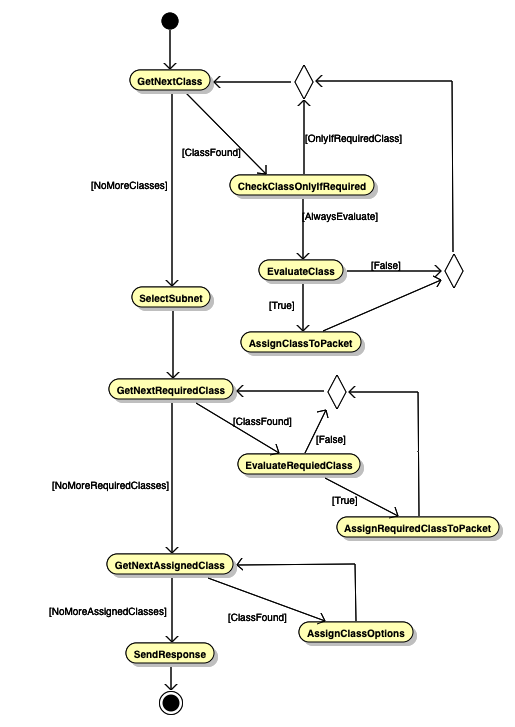
The server first iterates over the specified classes in the order in which they are defined in the configuration. For each class which is always to be evaluated, it performs the evaluation and assigns the class to the packet if the evaluation yields true; it skips all classes marked as only-if-required. After iterating over all the classes, the server selects the subnet. The subnet may include the required-client-classes parameter, which indicates which classes should be evaluated in addition to those already evaluated in the first step. The server iterates over these classes and evaluates them, assigning them to the packet when they match. Finally, for each class assigned to the packet the server checks whether any options are specified. Those options are assigned to the packet using the precedence algorithm described above.
In Kea 3.0.0+, it may be easier to use Option Class-Tagging (described earlier) to achieve this same goal. Defining the log-servers twice in the subnet and placing a client-classes guard, as appropriate, to limit assignment to only members of at least one of the listed class(es) is another way to attain this goal. For example:
"client-classes": [
    {
        "name": "Foo",
        "test": "option[vendor-class-identifier].text == 'CallCo'",
    }
],
"subnet4": [
    {
        "id": 1,
        "subnet": "192.0.2.0/24",
        "relay": {
            "ip-address": "192.0.2.100"
        },
        "option-data": [
            {
                "name": "log-servers",
                "data": "10.0.0.2",
                "client-classes": [ "Foo" ]
            },
            {
                "name": "log-servers",
                "data": "10.0.0.1"
            }
        ]
        ...
    }
]
A client whose packet evaluates to membership in "Foo" will receive the value "10.0.0.2" for the "log-servers" option. A client whose packet evaluated false for "Foo" will receive the value "10.0.0.1" for the "log-servers" option. Neither of these clients will receive these option values unless subnet "192.0.2.0/24" is selected.
Vendor-Specific Option Definition Class Restrictions
The mechanism by which it is possible to use different option definitions for different types of clients is well-described in the Kea ARM.
Some Examples of Class Membership Tests
The client classification engine in Kea has a rather powerful expressions engine that is used to "test" membership of client packets in the defined classes. This engine is also used in several other areas of Kea (e.g., the libdhcp_flex_id.so flexible identifier hook). This engine is described here in the ARM. As good as the documentation is, some additional examples provided here may be of some benefit.
Matching by hardware address
This is perhaps the most basic matching that might be done. There are a couple of ways that a hardware address might be matched. The basic unit is pkt4.mac, which can be combined with the hexstring() function to match a traditionally formatted hardware address (e.g., "test": "hexstring(pkt4.mac, ':') == '00:0c:01:02:03:04'"). Alternatively, the hex of the hardware address may be matched directly (e.g., "test": "pkt4.mac == 0x000c01020304")
Option 82-based matching
Another popular match that is often performed is option 82 data by suboption 1 (circuit-id) or 2 (remote-id) to add a client from a specific location to a class for some purpose (e.g., adding the client to the special "DROP" class). There are two ways to access this option and its suboptions. The first is option[82].[n], where n is 1 or 2. A better way is relay4[n], where n is 1 or 2. This can be combined with the hex suffix to use text-based matching (provided printable characters are in the suboption). For example: "test": "relay4[1].hex == 'vlan12'" will match the circuit-id that has "vlan12" as the value.
Suboption 2 often contains the hardware address of, for example, a wireless radio receiver. This can be matched in a similar way to the hardware address matching shown earlier, using hexstring() and the hex suffix. For example: "test": "hexstring(relay4[2].hex, ':') == 'aa:bb:cc:dd:ee:ff'",
Substring and text-based matching
Another commonly used function in Kea's client classification expression matching is the substring() function. A few common usage scenarios are covered below.
Option 60 partial string matching
Option 60 (vendor-class-identifier) is often matched to identify equipment from a specific manufacturer for some purpose. For example, suppose all equipment from the ACME Anvil Corporation transmits option 60 beginning with "ACME Anvil" followed by some model information. These could all be matched thusly: "test": "substring(option[60].hex, 0, 10) == 'ACME Anvil'" which would allow adding them all to the same class where some options specific to the brand might be specified.
Hardware address partial matching by OUI
Some clients may not include Option 60, which would prevent the matching described above. Each manufacturer is assigned one or more hardware address prefixes or Organizationally Unique Identifiers (OUI). These can be matched using a combination of substring(), and hexstring(). Imagine that the previously mentioned ACME Anvil Corporation does not include option 60 but all of their equipment has the OUI of 00:0c:01. This could be matched like this: "test": "substring(hexstring(pkt4.mac, ':'), 0, 8) == '00:0c:01'". Most larger organizations have several of these, which can still be handled as explained below in the "Matching by multiple parameters" section.
Partial matching of option 82 data
In some cases, a partial option 82 data match may be necessary to apply some specific options to a group of clients in the same location, or for some other purpose. This is commonly necessary for service providers. A circuit-id (option 82 suboption 1) may contain some string like: "vlan12:shelf2:gpon43:66". All of the customers attached to vlan12:shelf2 need some specific options. Matching to "vlan12:shelf2:" will make it possible to add them all to the same class for application of the special options. This can be done like this: "test": "substring(relay4[1].hex, 0, 14) == 'vlan12:shelf2:'"
Matching by multiple parameters
Sometimes, it is necessary to match client packets using multiple parameters so that precisely the correct group of clients can be targeted. A couple of examples of this are given below.
Matching using Option 82 and Option 60
Combining previous examples, it might be necessary to match only ACME Anvil Corporation equipment by option 60 that is attached to vlan12:shelf2. This can be done in this way: "test": "substring(option[60].hex, 0, 10) == 'ACME Anvil' and substring(relay4[1].hex, 0, 14) == 'vlan12:shelf2:'". This will add all clients whose Option 60 content begins with "ACME Anvil" and that are attached to vlan12:shelf2 to the class where some specific options might be applied.
Matching multiple OUI
Earler, it was shown how to match a single OUI for an organization. As mentioned in that example, often the organization will have several OUI assigned. Combining this with the above example, where we want to match all of the ACME Anvil Corporation equipment that is attached to vlan12:shelf2, this expression can be used: "test": "(substring(hexstring(pkt4.mac, ':'), 0, 8) == '00:0c:01' or substring(hexstring(pkt4.mac, ':'), 0, 8) == '00:0c:02' or substring(hexstring(pkt4.mac, ':'), 0, 8) == '00:0c:03') and substring(relay4[1].hex, 0, 14) == 'vlan12:shelf2:'". In this case, the ACME Anvil Corporation has been assigned OUI of 00:0c:01, 00:0c:02, and 00:0c:03. These are matched first inside the parentheses. This is followed by and then the expression limiting the match to option 82 suboption 1 that begins with vlan12:shelf2.
Using ifelse() for more complex matching
The client classification expression engine has a more complex feature that allows complex logic called the ifelse() function. The basic usage is ifelse(condition, result1, result2) where "condition" is the thing to be tested. If the test is successful or true, then "result1" is returned, else, "result2" is returned. It gets more powerful here, though, as "result1" and/or "result2" can be another ifelse() statement. These can be quite difficult for humans to read, however, as they cannot contain newline characters. It is often easier for humans to add newline characters as development of the expression occurs. When development is complete, remove the newline characters and place the expression into the configuration. The Forensic Logging hook (libdhcp_legal_log.so) uses the classification expression engine. An example of breaking out the newline characters is included in the documentation. This is shown below:
{
    "request-parser-format":
        "ifelse(pkt4.msgtype == 4 or pkt4.msgtype == 7,
            'Address: ' +
            ifelse(option[50].exists,
                addrtotext(option[50].hex),
                addrtotext(pkt4.ciaddr)) +
            ' has been released from a device with hardware address: hwtype=' + substring(hexstring(pkt4.htype, ''), 7, 1) + ' ' + hexstring(pkt4.mac, ':') +
            ifelse(option[61].exists,
                ', client-id: ' + hexstring(option[61].hex, ':'),
                '') +
            ifelse(pkt4.giaddr == 0.0.0.0,
                '',
                ' connected via relay at address: ' + addrtotext(pkt4.giaddr) +
                ifelse(option[82].option[1].exists,
                    ', circuit-id: ' + hexstring(option[82].option[1].hex, ':'),
                    '') +
                ifelse(option[82].option[2].exists,
                    ', remote-id: ' + hexstring(option[82].option[2].hex, ':'),
                    '') +
                ifelse(option[82].option[6].exists,
                    ', subscriber-id: ' + hexstring(option[82].option[6].hex, ':'),
                    '')),
            '')",
This example shows how powerful this mechanism can be. There is a lot more here than would normally be used in client classification, however, as the forensic log must descend into certain parts of the packet (e.g., Option 82) to obtain suboptions and log the contents of other options, but only if they exist. This is so that certain extra text will only appear in the log if the option was present. Client classification probably wouldn't have so many dependencies.
A client classification use case for this might be adding clients to a certain class if they are missing option 82 suboption 1, so that some special action might be performed (such as denying address assignment or assignment from a special pool). This would allow identification of clients that, for some reason, were missing the circuit-id. A further wrinkle here could be that some relay agents don't add option 82 (or some packets aren't relayed at all), so you need to check further only if option 82 exists.
This could be accomplished in this way: "test": "ifelse(option[82].exists, ifelse(option[82].option[1].exists, '', 'true'), '') == 'true'". If the client packet includes option 82, then the existence of suboption 1 is checked. If suboption 1 does not exist, then the word "true" is returned which we match for inclusion in the class. Otherwise, if option 82 is not present in the packet or it is and suboption 1 is also present, then we return an empty string which won't match and the client won't be added to the class.