


Introduction
perfdhcp is a tool to generate DHCP client traffic. It can be used to benchmark DHCP server performance, or to reproduce specific scenarios for testing. It is capable of simulating most client interactions, but there are some small limitations. The command generally needs to be run with root permissions (e.g., with sudo).
The latest documentation of perfdhcp can be found in the Kea ARM or by executing man perfdhcp on a server where it is installed. This document concerns itself with the most common practical usages; consult the manual for other scenarios.
perfdhcp is not a full DHCP client implementation; it only requests leases. It never configures anything to actually use the leases and IP addresses it obtains.
Test environment
Before we dig into perfdhcp, we should make it clear that the testing we describe here should only be done in a controlled lab environment. Doing this on a "real" production network is not recommended, and could disrupt normal service. With modern virtualization techniques, you can easily construct a "virtual lab" with multiple servers and clients, all running in virtual machines, on an isolated virtual network.
Resetting the test environment
Before starting a new test run, it is usually a good idea to clear all remnants of previous test runs. This ensures you start from a clean slate, and allows you to keep separate files for each test run.
A typical lab reset procedure might be:
- Stop any running
perfdhcpclients - Stop all Kea daemons on the server(s)
- Stop any packet captures (tcpdump, Wireshark, etc.)
- Move/delete any lease file(s) on the Kea server(s)
- Move/rotate/delete Kea log file(s)
- Restart packet capture(s) (if applicable)
- Start the Kea server daemons again
- Invoke the next
perfdhcptest run
Basic usage
The general syntax is: perfdhcp [options] <where>
In the above, <where> means the source or destination (or both) for the DHCP exchange. Options are the switches, like -4 or -p; most options require a following parameter. While options are technically not required, most real-world invocations use several options.
Source or Destination
You need to specify one or both of:
- A local network interface,
-l, as the source of the DHCP exchange - A IP address argument, as the destination DHCP server
Use the -l option to specify the local interface (that is lowercase letter l, not number 1, nor letter i). For example:
perfdhcp [options] -l eth0
To specify a destination IP address, provide it as a non-option argument. For example:
perfdhcp [options] 192.0.2.67
For the local interface scenario, perfdhcp sends packets much like a DHCP client would for the first time, without knowing anything about the DHCP server.
When given a destination IP address, perfdhcp sends the packets directly to the given IP address — presumably your DHCP server. In this latter scenario, perfdhcp acts more like a client performing a renewal, or a DHCP relay agent.
For DHCPv6, specifying a unicast destination IP address for a Kea DHCP server generally requires relay encapsulation. Otherwise, kea-dhcp6 will complain that the packet should have been sent to a multicast address, and will refuse to answer. Relay encapsulation can be done with the -A option to perfdhcp.
Common options
While perfdhcp has many options, here are the most commonly used:
-4specifies DHCPv4. This is the default, so it is rarely given explicitly, except in documentation like this.-6specifies DHCPv6. You cannot use-4and-6together.-r <rate>where<rate>is a positive integer. This specifies a target number of exchanges per second (DORA or SARR). The default is basically "as fast as possible."-R <qty>where<qty>is a positive integer. This specifies the number of different clients that are simulated. The default is1(simulate a single DHCP client).-p <time>where<time>is a positive integer. This specifies the number of seconds to run the test. If omitted, the test is run until it is manually canceled, or some other specified exit condition is reached.
Simple commands
One DHCPv4 request
The following command will perform a single DHCPv4 exchange (DORA):
sudo perfdhcp -r 1 -p 1 -l eth0
The above will send DHCPv4 exchanges at the rate of one per second (-r 1) for a total of one second (-p 1) using the interface eth0. It uses the default of simulating one client. One client, once per second, for a total of one second, taken together, results in a single request.
One DHCPv6 request
The following command will perform a single DHCPv6 exchange (SARR):
sudo perfdhcp -r 1 -p 1 -l eth0 -6
As you can see, it takes the same form as the DHCPv4 version above, except with the addition of the -6 option.
Multiple clients
perfdhcp can easily simulate hundreds or thousands of DHCP clients, subject to the limitations of your test hardware. It can also make repeated lease requests.
sudo perfdhcp -r 2 -R 10 -p 60 -l eth0
The above attempts two exchanges per second (-r 2), simulating up to ten different clients (-R 10), for one minute (-p 60). After five seconds (ten clients, two per second), the requests will "loop around" and start repeating — effectively an early renewal request.
Testing High Availability Failover
This assumes you already know how Kea High Availability (HA) works. See the Kea ARM section about HA if you do not.
Both DHCPv4 and DHCPv6 have mechanisms to report how long they have been trying to obtain a lease. It is possible to use perfdhcp to simulate clients that are not receiving a timely answer to their DHCP requests, by artifically increasing the time reported. This allows you to test Kea's HA function by simulating the kind of trouble that normally triggers a failover.
This is done with the -y and -Y options, which must be used together. Both require an integer as a parameter, indicating seconds.
-Ysets the wait time until the trouble-simulation starts. The timer begins whenperfdhcpbegins running. Once-Yseconds have elapsed,perfdhcpstarts the trouble simulation. This may be zero, to start immediately.-ysets the duration of the trouble simulation. This must be positive; some larger number is usually appropriate. The timer begins once the the-Ywait has expired. After-yseconds have elapsed,perfdhcpstops simulating trouble, and behaves normally again.
For example:
sudo perfdhcp -4 -r 1 -R 11 -p 7200 -Y 1 -y 7199 -l ens19
Given the above, perfdhcp will attempt DHCPv4 DORA exchanges on interface ens19 at the rate of 1 per second (-r1) while simulating 11 clients (-R 11). It will do this for 2 hours (-p 7200). After a one-second delay (-Y 1), it will start increasing the "SECS" field in the DHCP packets. It will do this until the end of the run (-y 7199, plus the one-second -Y delay, bringing it to 7200, matching -p).
When run against a Kea HA setup, if one of the active servers is then shut down, failover should occur about 1 to 2 minutes later. This assumes the default settings of:
max-unacked-clients= 10max-response-delay= 60000 (in milliseconds, so 60 seconds)
Performance testing
The original purpose of perfdhcp was as a performance-testing tool, so any article about it would be incomplete without an explanation of how you might use it in this way. This article will cover one of these ways.
The example below is from virtual machine (VM) infrastructure running on modest consumer hardware; proper bare-metal hardware should be able to achieve higher performance than this. It is best to use separate hardware for perfdhcp.
In some cases, it may be necessary to use multiple servers running perfdhcp in concert, as a single instance of perfdhcp may become the bottleneck. It is also important to note that your server should not be in production during testing, and must have enough addresses available. RFC 2544 defines a range of addresses specifically for benchmarking: 198.18.0.0/15. RFC 1918 is also commonly used. We used a pool of 172.16.0.0/12 during this example to make sure there were plenty of addresses available.
First, establish a baseline of performance. In this example, we started with a larger exchange rate that we knew the server could not hit: sudo perfdhcp -4 -p 60 -r 20000 -R 10000 -l ens19 (20,000 DORA exchanges per second from 10,000 clients). The output has a statistic called "drops ratio" for both DISCOVER-OFFER and REQUEST-ACK. These statistics are important throughout this test; they were both quite high, at around 75% during this initial baseline. The kea-dhcp4 service was using all of the available two cores (200%). We were aiming for the highest exchange rate achievable while the drops rate stays under 1%.
Next, we repeated the performance test reducing the exchange rate by an order of magnitude: sudo perfdhcp -4 -p 60 -r 2000 -R 10000 -l ens19 There were no drops during this test. The Kea service used a little more than 100% CPU and the drops ratio was under 1%.
Then, we doubled the exchange rate. sudo perfdhcp -4 -p 60 -r 4000 -R 10000 -l ens19 yielded around 197% CPU usage by the Kea service. The drops ratio rose to around 6-10%. This server cannot maintain this exchange rate.
The next value we tried was halfway between the 2000 that was achievable and the 4000 that was not. sudo perfdhcp -4 -p 60 -r 3000 -R 10000 -l ens19 yielded around 170% CPU usage by the Kea service. The drops rate dipped well below 1%.
Next, we tried moving to a 3500 exchange rate, halfway between the new achievable and unachievable rates. kea-dhcp4 CPU usage during the sudo perfdhcp -4 -p 60 -r 3500 -R 10000 -l ens19 test rose to nearly 200% but the drops rate stayed below 1%.
This was the performance rate result that we settled on for this example performance test. As a final sanity check, we multiplied the exchange rate by the number of seconds (3,500 * 60 = 210,000) to simulate a constant rate of new clients: sudo perfdhcp -4 -p 60 -r 3500 -R 210000 -l ens19. This resulted in a 2-3% drop rate, which seems not unreasonable for a total of 12,600,000 clients (when extrapolated to an hour) on our less-than-ideal test setup.
More advanced usage
It is possible to use perfdhcp to simulate nearly any DHCP traffic, with a few limitations. It can get complicated, though, because perfdhcp requires almost everything to be specified as raw bytes using hexadecimal notation. It does not provide an interface for more sophisticated data types, such as IP addresses or DHCP options, and it starts to get very complicated when you need to specify suboptions. Sometimes, you need to even use the template feature (more on that later).
Hexadecimal notation
perfdhcp uses hex notation extensively.
bindechexascii
Many examples below show bindechexascii, a handy command-line tool for converting various data types to hexadecimal notation. It is available on Github, and also as a package in Debian and Ubuntu (and perhaps other distributions) with sudo apt install bindechexascii. You can use a different tool for hex conversion, if you prefer.
Zero padding
perfdhcp expects a string of 8-bit bytes in hex notation, with each byte represented as two hex digits. If the desired hex value is a single digit (single character), you need to pad it with a leading zero. For example, the value 2 becomes 02; the value D becomes 0D.
In some protocol fields, multi-byte values may be expected. They will need to be padded with correspondingly longer sequences of zeros.
The output of bindechexascii and other calculators often does not include leading zeros.
Hex notation affixes
In some variations of hexadecimal notation, various affixes are sometimes used to make the use of hex explicit. Most common are the prefixes 0x or $, or the suffix h (examples: 0x10, $10, 10h).
perfdhcp expects unadorned hex values (10) and will reject any such affixes.
This document uses the unadorned format perfdhcp expects. In this document, the use of hex is identified by context and/or monospace text. For example, 10 would indicate 10 hex, or 16 in decimal.
Sending DHCP options
To have perfdhcp send a DHCP option, you can use the -o option. The -o option requires a parameter, made up of the DHCP option number and the payload, separated by a comma. perfdhcp handles encoding the option code and the length. The option code is given in decimal, but the entire payload must be explicitly specified in hex notation. For example:
-o 81,0400000B6D65726368616E64697365076578616D706C6503636F6D00
Sending the Fully Qualified Domain Name
A reasonably complicated example of specifying an option is probably best here. We will use option 81, which specifies the client's Fully Qualified Domain Name (FQDN). It supports both RFC 1035-encoded and ASCII-encoded fully qualified domain names, as well as having some extra fields at the beginning of the option.
Option 81 wire format
The goal here is to send the name merchandise.example.com, along with appropriate flags. The basic parts of the option are (each table cell represents a single byte):
 +------+------+------+------+------+------+----
 | Code | Len  |Flags |RCODE1|RCODE2| Domain Name
 +------+------+------+------+------+------+----
 |  81  |  28  |  NEOS|  0   |  0   |   m     e   ...
 +------+------+------+------+------+------+----
Within the 1-byte flags field, the individual bits are:
|0 1 2 3 4 5 6 7|
+-+-+-+-+-+-+-+-+
|  MBZ  |N|E|O|S|
+-+-+-+-+-+-+-+-+
Two different encodings of the domain name are possible, as specified by the E flag:
- E = 0: Deprecated ASCII format. The FQDN is encoded in ASCII with a trailing dot:
merchandise.example.com.. - E = 1: DNS wire format. The FQDN is encoded as a sequence of length-prefixed labels, as specified in RFC 1035 section 3.1. For example:
<11>merchandise<7>example<3>com<0>, where the digits in angle-brackets are the length value prefixes, stored at that position as unsigned 8-bit integers. The final zero-length label terminates the name.
All of the above describe the DHCP packet as it appears on the network. As noted, perfdhcp requires data we give it to be encoded using hex notation. Thus, for the domain name, we have to encode it twice, once as required by the DHCP protocol (shown above), and again to present it to perfdhcp (as explained below).
Encoding the flags
The first step is to figure out what content to include to represent the flags field.
Flags:
- MBZ (reserved) = 0000
- N = 0
- E = 0 or 1
- O = 0
- S = 0
For E = 0, the hex value of the flags field is 00, and for E = 1 it is 04. Determining this using bindechexascii is shown below.
$ bindechexascii --b2h 00000000
Binary to Hexadecimal: 0
$ bindechexascii --b2h 00000100
Binary to Hexadecimal: 4
As noted above, perfdhcp expects 8-bit bytes, meaning two hex characters. Thus, for our purposes, 0 or 4 must be padded to two characters with a leading zero: 00 or 04.
RCODE fields
The next part are the deprecated fields RCODE1 and RCODE2, which just need to contain 0s when sent by the client.
- RCODE1 =
00 - RCODE2 =
00
Domain name as ASCII
The encoding of the domain name is dependent on the value set for E. If the E flag is not set (bit value 0) then the FQDN is encoded as plain ASCII, with a trailing dot. This format is deprecated but easy to understand. For our example, it would be the following sequence of bytes:
m  e  r  c  h  a  n  d  i  s  e  .  e  x  a  m  p  l  e  .  c  o  m  .
6D 65 72 63 68 61 6E 64 69 73 65 2E 65 78 61 6D 70 6C 65 2E 63 6F 6D 2E
For the E=0 scenario, the entire FQDN can be encoded in one command:
$ bindechexascii --a2h merchandise.example.com.
ASCII to Decimal: 6D 65 72 63 68 61 6E 64 69 73 65 2E 65 78 61 6D 70 6C 65 2E 63 6F 6D 2E
When presenting this to perfdhcp, the hex bytes are given as one long string, without spaces:
6D65726368616E646973652E6578616D706C652E636F6D2E
Domain name in RFC 1035 encoding
If the E bit is set (bit value 1), then the RFC 1035 encoding must be used; this is the preferred format. For merchandise.example.com, this would be three labels encoded in hex as shown below.
$ bindechexascii --a2h merchandise
ASCII to Decimal: 6D 65 72 63 68 61 6E 64 69 73 65
$ bindechexascii --a2h example
ASCII to Decimal: 65 78 61 6D 70 6C 65
$ bindechexascii --a2h com
ASCII to Decimal: 63 6F 6D
You also need to encode the lengths and zero-terminator as hex. In our example, merchandise is 11 characters long, example is 7 characters, and com is of course 3 characters:
$ bindechexascii --d2h 11
Decimal to Hexadecimal: B
$ bindechexascii --d2h 7
Decimal to Hexadecimal: 7
$ bindechexascii --d2h 3
Decimal to Hexadecimal: 3
$ bindechexascii --d2h 0
Decimal to Hexadecimal: 0
Note that for values less than decimal 10, the hex notation is the same as the decimal notation. Zero is 0 in any base; however, decimal 11 is hex B. Again, these must be padded to two characters (with a leading zero) before giving them to perfdhcp.
So the entire name field, encoded in DNS wire format per RFC 1035 and then in hex notification, would be this sequence of bytes:
11 m  e  r  c  h  a  n  d  i  s  e  7  e  x  a  m  p  l  e  3  c  o  m  0
0B 6D 65 72 63 68 61 6E 64 69 73 65 07 65 78 61 6D 70 6C 65 03 63 6F 6D 00
Assembling the command
Putting this all together, the payload for option 81 (with E=1) would be:
E1 R1 R2 11 m  e  r  c  h  a  n  d  i  s  e  7  e  x  a  m  p  l  e  3  c  o  m  0
04 00 00 0B 6D 65 72 63 68 61 6E 64 69 73 65 07 65 78 61 6D 70 6C 65 03 63 6F 6D 00
The above sets the E flag, followed by two zero RCODE values, and then merchandise.example.com encoded in DNS wire format. The command to use this with perfdhcp might then be:
sudo perfdhcp -4 -r 1 -R 1 -p 2 -l ens19 -o 81,0400000B6D65726368616E64697365076578616D706C6503636F6D00
The above specifies DHCPv4 (-4), with a single client (-R 1) and a single DORA exchange (-R 1 -p 1, using local interface ens19, and including DHCP option 81 (-o 81).
Sending relay-agent options in DHCPv4
Another popular activity is testing with option 82 sub-options; this is only slightly more difficult. perfdhcp does not have support for sub-options, so the entire content of the sub-option must be explicitly encoded in hex. These are described in RFC 3046, but essentially the content of the sub-options is of the form <sub-id><sub-length><sub-data>, which are all concatenated into the option 82 like so: <overall-id><overall-length><id1><length1><data1><id2><length2><data2>, where overall-id is 82, and overall-length is the length of all of of the content of all of the sub-options (but not including the overall-length or overall-id). Other options besides 82 use the same sub-option format.
For example, suppose you wanted to send option 82, with vlan5 as sub-option 1 and aa:bb:cc:dd:ee:ff as sub-option 2. The following list provides details about how this would be done.
- Sub-option 1
- Encode the text with
bindechexascii --a2h vlan5, which gives us766C616E35. - The length is 5 bytes, or
05as a byte in hex. - The sub-id of 1 is
01in hex. - Together you have:
0105766C616E35as the content of sub-option 1.
- Encode the text with
- Sub-option 2
- The MAC address is already in hex and doesn't need conversion; just remove the colons:
aabbccddeeff - The length is 6 or
06hex. - The sub-id is 2 or
02hex. - Combined:
0206aabbccddeeff.
- The MAC address is already in hex and doesn't need conversion; just remove the colons:
- The two sub-options can be concatenated as the payload for option 82:
0105766C616E350206aabbccddeeff.
The perfdhcp command to send this would be:
sudo perfdhcp -4 -r 1 -R 1 -p 2 -o 82,0105766C616E350206aabbccddeeff 10.0.0.1
These can get pretty long, depending on what combination of options and sub-options needs to be sent.
Sending relay-agent options in DHCPv6
Sending relay-agent options is a little more complicated in DHCPv6 than it is in DHCPv4, because the DHCP message itself needs to be encapsulated inside a relay header. The relay agent options are then added at the relay level, rather than the original DHCP level. This is described in RFC 8415.
To our advantage, perfdhcp has features to make this easier (added in Kea 2.3.8 with GitLab #2834):
- The
-Aoption specifies the number of encapsulations to wrap around the innermost DHCP message. The default is 0, and the maximum is currently 1. - The
--oroption specifies a DHCP option, similar to-o, but adding an encapsulation level before the option code, separated by a colon. That is:--or <encap>:<code>,<payload>. As with-o,--orexpects the option code in decimal and the payload as hex-encoded bytes.
Making things simpler, some parameters that, in DHCPv4, require option and sub-option are top-level options in DHCPv6, eliminating the need to manually calculate and encode sub-option lengths.
The examples below illustrate testing with option 18, interface-id and option 37, remote-id.
Option 18
For example, suppose we need to send the text vlan5 in option 18, similar to the example for DHCPv4. We use the same hex encoding of 766C616E35 for the text.
Option 37
Option 37 is a little more complicated. After the standard option-ID and length, the option data consists of a 32-bit enterprise-ID, followed by a variable-length remote-ID. The hex-encoded payload will thus be enterprise-ID+remote-ID.
For this example, the enterprise-ID of 32473 (decimal) will be used. The command bindechexascii --d2h 32473 tells us that is 7ED9 in hex. Since this is a 32-bit (4-byte) number, it will need to have zeroes added for padding: 00007ED9.
The remote-ID is vendor-specific, as determined by the enterprise-ID field. It could be a binary value, an ASCII string, structured data, or something else. For this example, we will use the text isc.org. With bindechexascii --a2h isc.org we get the hex: 6973632E6F7267.
Together, the above enterprise-ID and remote-ID combine to: 00007ED96973632E6F7267
Assembling the command
The complete command is then:
sudo perfdhcp -6 -r 1 -R 1 -p 2 -A 1 --or 1:18,766C616E35 --or 1:37,00007ED96973632E6F7267 fd00::1
This will run a test using DHCPv6 (-6), at a rate of one per second (-r 1), for a total of 2 seconds (-p 2), simulating one client (-R 1), with one level of encapsulation (-A 1). The two DHCP options --or each begin with 1: to specify that same first level of encapsulation, followed by the option code in decimal and the option payload in hex.
Note that as both are top-level options, we did not need to encode sub-options or lengths. perfdhcp calculates and includes the length of the top-level options for us.
Templates
Templates allow us to do two things:
- To store frequently used
perfdhcpcommand lines in files, for easy reference and reuse. - To allow
perfdhcpto simulate multiple clients by automatically varying a portion of the message it sends to the DHCP server.
Template file format
Template files have a simple format:
- They contain only hex data, with optional spaces.
- The entire file must consist of a single line of hex.
- There must be an even number of hex digits (two hex digits per byte).
Preparing a test Kea server
In the following examples, we will be sending DHCPv6 SOLICIT messages, so we'll need a DHCPv6 server to answer them. Let's start Kea on a loopback interface for this, using this configuration:
{
    "Dhcp6": {
        "option-data": [],
        "subnet6": [
            {
                "subnet": "2001:db8:1::/64",
                "pools": [
                    {
                        "pool": "2001:db8:1::51-2001:db8:1::5200"
                    }
                ],
                "interface": "lo0"
            }
        ],
        "interfaces-config": {
            "interfaces": [
                "lo0"
            ]
        },
        "loggers": [
            {
                "name": "kea-dhcp6",
                "output-options": [
                    {
                        "output": "stdout"
                    }
                ],
                "severity": "INFO",
            }
        ],
        "lease-database": {
            "type": "memfile"
        }
    }
}
Start Kea with sudo kea-dhcp6 -c kea-dhcp6.conf and wait until it's operational.
A single SOLICIT
We'll take a look at an example of using templates to send a DHCPv6 SOLICIT message; perfdhcp has built-in support for sending the same kind of message. In practice, we might modify such a template to use unusual/non-standard values for testing, or to simulate malfunctions.
Obtaining packet data
Firstly we need the hex representation of the packet. The easiest way to obtain this is to open a network traffic capture using Wireshark that contains DHCP v6 traffic and find a SOLICIT message:
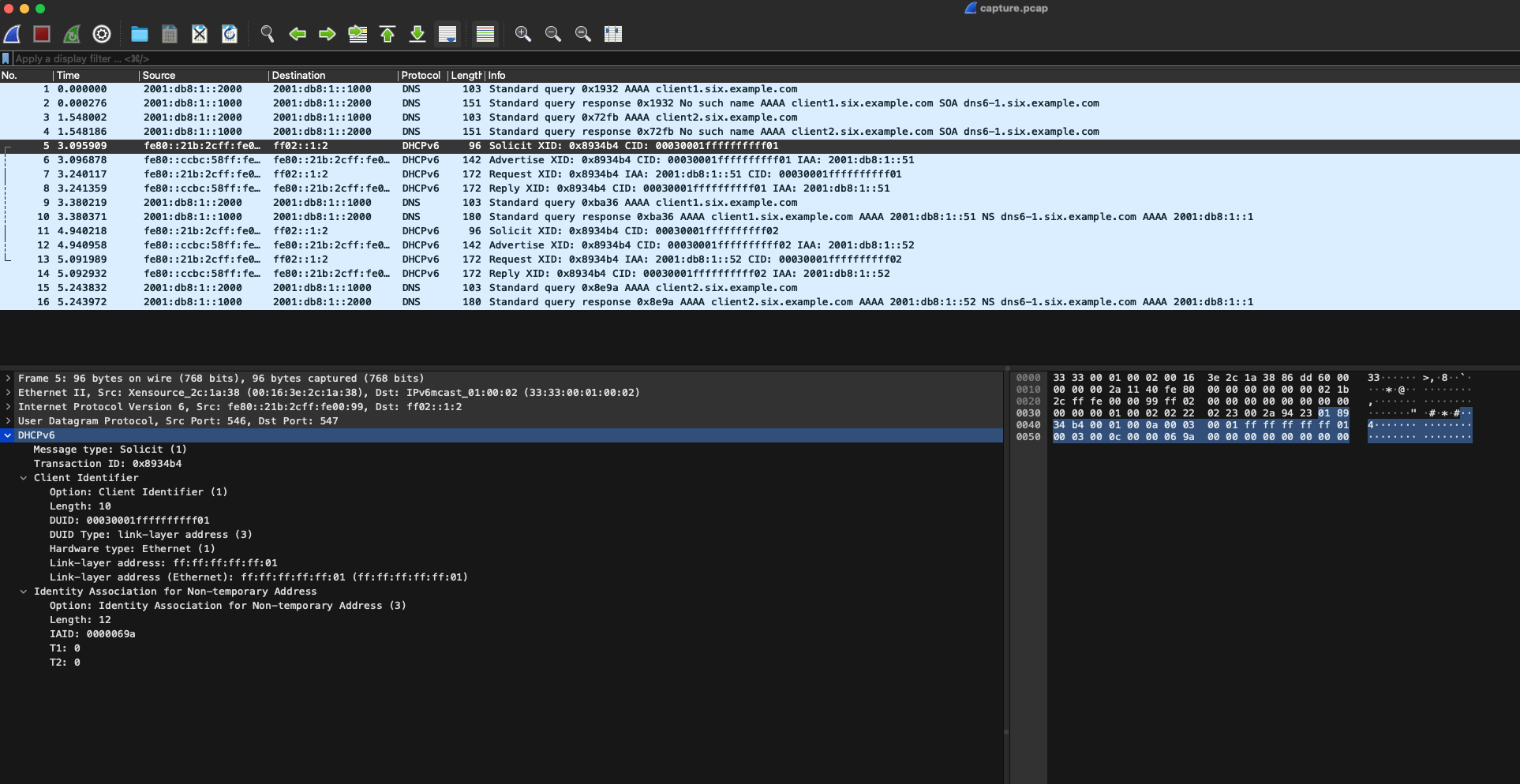
In the Packet Details pane (lower left in the screenshot), find the "DHCPv6" portion of the packet. Right-click that, then click "Copy", and then "...as a Hex Stream":
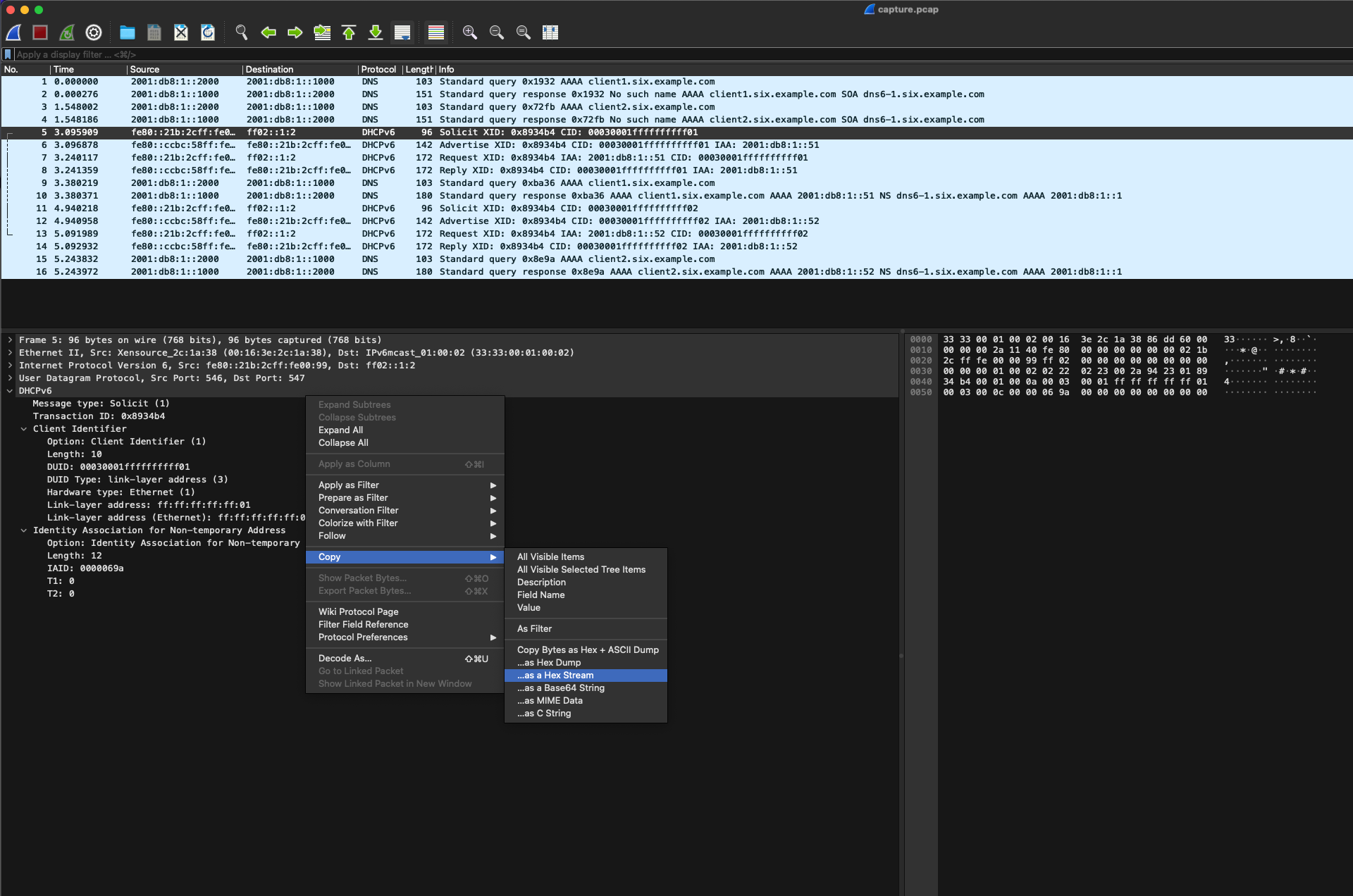
Open a new text file, e.g. template_solicit, and paste the copied stream into it. Verify that the contents are correct, then save it, for example, using cat (press CTRL+D after pasting to send end-of-file):
$cat >template_solicit
018934b40001000a00030001ffffffffff010003000c0000069a0000000000000000
Prepare the lab test
Reset your lab environment if needed, and then make sure the Kea test server is ready. Start the packet capture with:
sudo tcpdump -i lo0 -c 1000 -v -w perfdhcp_generated_traffic.pcap
Run the test
Now it's time to generate some traffic, using perfdhcp and the template file. Open another new terminal window, and run:
sudo perfdhcp -6 -l lo0 -r 1 -p 5 -T template_solicit
We use -r 1 -p 5 to not flood our server; perfdhcp will execute one exchange per second for 5 seconds, then exit. See the sample perfdhcp output below.
If all is successful, Kea will assign addresses and send leases, and it will log activity to the terminal. See the sample kea-dhcp6 output below.
Reviewing the results
Stop tcpdump and open the file perfdhcp_generated_traffic.pcap in Wireshark. Each SOLICIT message generated will be exactly the same as the one in the template.
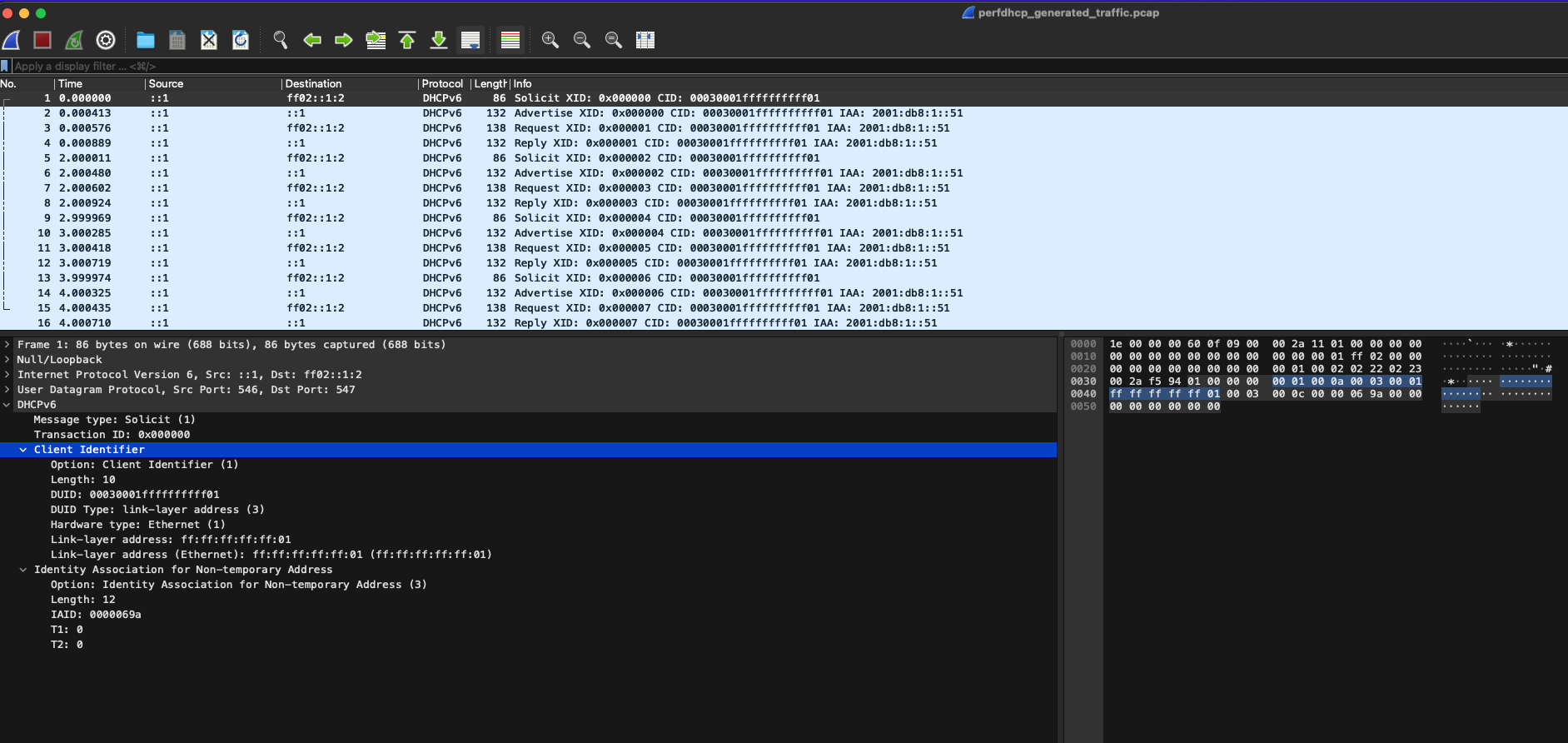
You can also verify in the Kea leases file that only one address was assigned to one client.
Sample perfdhcp output
$ sudo perfdhcp -6 -l lo0 -r 1 -p 5 -T template_solicit

Running: perfdhcp -6 -l lo0 -r 1 -p 5 -T template_solicit
Scenario: basic.
Multi-thread mode enabled.
***Rate statistics***
Rate: 0.799901 4-way exchanges/second, expected rate: 1

***Malformed Packets***
Malformed Packets: 0
***Statistics for: SOLICIT-ADVERTISE***
sent packets: 4
received packets: 4
drops: 0
drops ratio: 0 %
orphans: 0
rejected leases: 0
non unique addresses: 0

min delay: 0.451 ms
avg delay: 0.707 ms
max delay: 0.857 ms
std deviation: 0.153 ms
collected packets: 0

***Statistics for; REQUEST-REPLY***
sent packets: 4
received packets: 4
drops: 0
drops ratio: 0.000 %
orphans: 0
rejected leases: 0
non unique addresses: 0

min delay: 0.326 ms
avg delay: 0.398 ms
max delay: 0.457 ms
std deviation: 0.056 ms
collected packets: 0
Sample kea-dhcp6 output
(Some parts of the output have been omitted for space and clarity.)
DHCP6_STARTING Kea DHCPv6 server version 2.5.6-git (development) starting
...
DHCP6_STARTED Kea DHCPv6 server version 2.5.6-git started
DHCP6_QUERY_LABEL received query: duid=[00:03:00:01:ff:ff:ff:ff:ff:01], [no hwaddr info], tid=0x0
DHCP6_LEASE_ADVERT duid=[00:03:00:01:ff:ff:ff:ff:ff:01], [no hwaddr info], tid=0x0: lease for address 2001:db8:1::51 and iaid=1690 will be advertised
DHCP6_QUERY_LABEL received query: duid=[00:03:00:01:ff:ff:ff:ff:ff:01], [no hwaddr info], tid=0x1
DHCP6_LEASE_ALLOC duid=[00:03:00:01:ff:ff:ff:ff:ff:01], [no hwaddr info], tid=0x1: lease for address 2001:db8:1::51 and iaid=1690 has been allocated for 7200 seconds
DHCP6_QUERY_LABEL received query: duid=[00:03:00:01:ff:ff:ff:ff:ff:01], [no hwaddr info], tid=0x2
DHCP6_LEASE_ADVERT duid=[00:03:00:01:ff:ff:ff:ff:ff:01], [no hwaddr info], tid=0x2: lease for address 2001:db8:1::51 and iaid=1690 will be advertised
DHCP6_QUERY_LABEL received query: duid=[00:03:00:01:ff:ff:ff:ff:ff:01], [no hwaddr info], tid=0x3
DHCP6_LEASE_ALLOC duid=[00:03:00:01:ff:ff:ff:ff:ff:01], [no hwaddr info], tid=0x3: lease for address 2001:db8:1::51 and iaid=1690 has been allocated for 7200 seconds
DHCP6_QUERY_LABEL received query: duid=[00:03:00:01:ff:ff:ff:ff:ff:01], [no hwaddr info], tid=0x4
DHCP6_LEASE_ADVERT duid=[00:03:00:01:ff:ff:ff:ff:ff:01], [no hwaddr info], tid=0x4: lease for address 2001:db8:1::51 and iaid=1690 will be advertised
DHCP6_QUERY_LABEL received query: duid=[00:03:00:01:ff:ff:ff:ff:ff:01], [no hwaddr info], tid=0x5
DHCP6_LEASE_ALLOC duid=[00:03:00:01:ff:ff:ff:ff:ff:01], [no hwaddr info], tid=0x5: lease for address 2001:db8:1::51 and iaid=1690 has been allocated for 7200 seconds
DHCP6_QUERY_LABEL received query: duid=[00:03:00:01:ff:ff:ff:ff:ff:01], [no hwaddr info], tid=0x6
DHCP6_LEASE_ADVERT duid=[00:03:00:01:ff:ff:ff:ff:ff:01], [no hwaddr info], tid=0x6: lease for address 2001:db8:1::51 and iaid=1690 will be advertised
DHCP6_QUERY_LABEL received query: duid=[00:03:00:01:ff:ff:ff:ff:ff:01], [no hwaddr info], tid=0x7
DHCP6_LEASE_ALLOC duid=[00:03:00:01:ff:ff:ff:ff:ff:01], [no hwaddr info], tid=0x7: lease for address 2001:db8:1::51 and iaid=1690 has been allocated for 7200 seconds
Templates and multiple clients
In the previous section, we learned how to use templates to repeatedly send the same SOLICIT message. But what if we want to simulate multiple clients? Sending the same message every time won't work. Fortunately, perfdhcp has an option to vary the client identifier sent from a template.
Offsets with -O
The -O option specifies an offset in bytes within the template - the bytes represented by the long hex string, where two hex digits encode one byte. The offset itself is specified in decimal.
For the -O option, perfdhcp assumes you are modifying a client identifier as used by the DHCP version. For DHCPv4, this is a 6-byte MAC address; for DHCPv6, this is the DUID.
The -O value must specify the offset of the last byte of the relevant identifier: i.e. the least significant byte, and the one closest to the end of a packet capture display.
The -O value is an offset: a displacement from the start of the template. In other words, offsets count from zero. An offset of 0 is the first byte of the template; an offset of 1 is the second byte of the template; an offset of 2 is the third byte, etc.
perfdhcp will not accept a value for -O of 3 or below. The first four bytes of a DHCP message are the protocol message type and the transaction ID, and cannot be modified with -O. The minimum value of -O is 4, or the fifth byte.
Determining the offset
We want to randomize the client's DHCP Unique Identifier (DUID), so that each request appears to come from a different client. In DHCPv6, the DUID is sent as DHCP option 1. (This can be seen in the first Wireshark screenshot.)
Continuing from the previous example, our template is:
018934b40001000a00030001ffffffffff010003000c0000069a0000000000000000
Breaking that down into individual bytes, the first 20 bytes are:
| Offset | Hex | Remarks |
|---|---|---|
| 00 | 01 |
DHCP Message Type; 01 = SOLICIT |
| 01 | 89 |
DHCP Transaction ID, high byte |
| 02 | 34 |
DHCP Transaction ID, middle byte |
| 03 | b4 |
DHCP Transaction ID, low byte |
| 04 | 00 |
DHCP Option ID, high byte |
| 05 | 01 |
DHCP Option ID, low byte; 0001 = Client Identifier |
| 06 | 00 |
DHCP Option length, high byte |
| 07 | 0a |
DHCP Option length, low byte |
| 08 | 00 |
DUID Type, high byte |
| 09 | 03 |
DUID Type, low byte, 0003 = Hardware address |
| 10 | 00 |
Hardware Type, high byte |
| 11 | 01 |
Hardware Type, low byte; 01 = Ethernet |
| 12 | ff |
Hardware address, highest byte |
| 13 | ff |
Hardware address, middle byte |
| 14 | ff |
Hardware address, middle byte |
| 15 | ff |
Hardware address, middle byte |
| 16 | ff |
Hardware address, middle byte |
| 17 | 01 |
Hardware address, lowest byte |
| 18 | 00 |
DHCP Option ID, high byte |
| 19 | 03 |
DHCP Option ID, low byte; 0003 = IA ID |
| 20 | 00 |
DHCP Option length, high byte |
| ... | ... | (The rest of the template follows) |
In the chart above, you can see that the DUID ends at offset 17, where the value in the template is 01. To have perfdhcp vary the DUID, we would thus use use -O 17 (with -R greater than 1).
Assembling the command
Reset your lab environment if needed, and then make sure the Kea test server is ready.
We'll use sudo perfdhcp -6 -l lo0 -r 3 -p 5 -T template_solicit -O 17 -R 1000 to specify:
-6DHCP version 6-l lo0to use loopback interfacelo0as the source of packets-r 3perform three exchanges per second-p 5run the test for five seconds-T template_solicitto use the template from thetemplate_solicitfile-O 17the offset in the template to vary-R 1000to simulate one thousand clients
The sample output of both client and server are provided below. We also provide a sample lease data file, where you can see that Kea assigned addresses to multiple client DUIDs.
Sample perfdhcp output
$ sudo perfdhcp -6 -l lo0 -r 3 -p 5 -T template_solicit -O 17 -R 1000
Running: perfdhcp -6 -l lo0 -r 3 -p 5 -T template_solicit -O 17 -R 1000
Scenario: basic.
Multi-thread mode enabled.
***Rate statistics***
Rate: 2.79936 4-way exchanges/second, expected rate: 3

***Malformed Packets***
Malformed packets: 0
***Statistics for: SOLICIT-ADVERTISE***
sent packets: 14
received packets: 14
drops: 0
drops ratio: 0 %
orphans: 0
rejected leases: 0
non unique addresses: 0

min delay: 0.304 ms
abg delay: 0.401 ms
max delay: 0.594 ms
std deviation: 0.094 ms
collected packets: 0

***Statistics for: REQUEST-REPLY***
sent packets: 14
received packets: 14
drops: 0
drops ratio: 0.000 %
orphans: 0
rejected leases: 0
non unique addresses: 0

min delay: 0.290 ms
abg delay: 0.331 ms
max delay: 0.423 ms
std deviation: 0.038 ms
collected packets: 0
Sample kea-dhcp6 output
(Some parts of the output have been omitted for space and clarity.)
DHCP6_STARTING Kea DHCPv6 server version 2.5.6-git (development) starting
...
DHCP6_STARTED Kea DHCPv6 server version 2.5.6-git started
DHCP6_QUERY_LABEL received query: duid=[00:03:00:01:ff:ff:ff:ff:ff:01], [no hwaddr info], tid=0x0
DHCP6_LEASE_ADVERT duid=[00:03:00:01:ff:ff:ff:ff:ff:01], [no hwaddr info], tid=0x0: lease for address 2001:db8:1::51 and iaid=1690 will be advertised
DHCP6_QUERY_LABEL received query: duid=[00:03:00:01:ff:ff:ff:ff:ff:01], [no hwaddr info], tid=0x1
DHCP6_LEASE_ALLOC duid=[00:03:00:01:ff:ff:ff:ff:ff:01], [no hwaddr info], tid=0x1: lease for address 2001:db8:1::51 and iaid=1690 has been allocated for 7200 seconds
DHCP6_QUERY_LABEL received query: duid=[00:03:00:01:ff:ff:ff:ff:ff:01], [no hwaddr info], tid=0x2
DHCP6_LEASE_ADVERT duid=[00:03:00:01:ff:ff:ff:ff:ff:01], [no hwaddr info], tid=0x2: lease for address 2001:db8:1::51 and iaid=1690 will be advertised
DHCP6_QUERY_LABEL received query: duid=[00:03:00:01:ff:ff:ff:ff:ff:01], [no hwaddr info], tid=0x3
DHCP6_LEASE_ALLOC duid=[00:03:00:01:ff:ff:ff:ff:ff:01], [no hwaddr info], tid=0x3: lease for address 2001:db8:1::51 and iaid=1690 has been allocated for 7200 seconds
DHCP6_QUERY_LABEL received query: duid=[00:03:00:01:ff:ff:ff:ff:ff:01], [no hwaddr info], tid=0x4
DHCP6_LEASE_ADVERT duid=[00:03:00:01:ff:ff:ff:ff:ff:01], [no hwaddr info], tid=0x4: lease for address 2001:db8:1::51 and iaid=1690 will be advertised
DHCP6_QUERY_LABEL received query: duid=[00:03:00:01:ff:ff:ff:ff:ff:01], [no hwaddr info], tid=0x5
DHCP6_LEASE_ALLOC duid=[00:03:00:01:ff:ff:ff:ff:ff:01], [no hwaddr info], tid=0x5: lease for address 2001:db8:1::51 and iaid=1690 has been allocated for 7200 seconds
DHCP6_QUERY_LABEL received query: duid=[00:03:00:01:ff:ff:ff:ff:ff:01], [no hwaddr info], tid=0x6
DHCP6_LEASE_ADVERT duid=[00:03:00:01:ff:ff:ff:ff:ff:01], [no hwaddr info], tid=0x6: lease for address 2001:db8:1::51 and iaid=1690 will be advertised
DHCP6_QUERY_LABEL received query: duid=[00:03:00:01:ff:ff:ff:ff:ff:01], [no hwaddr info], tid=0x7
DHCP6_LEASE_ALLOC duid=[00:03:00:01:ff:ff:ff:ff:ff:01], [no hwaddr info], tid=0x7: lease for address 2001:db8:1::51 and iaid=1690 has been allocated for 7200 seconds
DHCP6_QUERY_LABEL received query: duid=[00:03:00:01:ff:ff:ff:ff:ff:01], [no hwaddr info], tid=0x8
DHCP6_LEASE_ADVERT duid=[00:03:00:01:ff:ff:ff:ff:ff:01], [no hwaddr info], tid=0x8: lease for address 2001:db8:1::51 and iaid=1690 will be advertised
DHCP6_QUERY_LABEL received query: duid=[00:03:00:01:ff:ff:ff:ff:ff:01], [no hwaddr info], tid=0x9
DHCP6_LEASE_ALLOC duid=[00:03:00:01:ff:ff:ff:ff:ff:01], [no hwaddr info], tid=0x9: lease for address 2001:db8:1::51 and iaid=1690 has been allocated for 7200 seconds
DHCP6_QUERY_LABEL received query: duid=[00:03:00:01:ff:ff:ff:ff:ff:01], [no hwaddr info], tid=0xa
DHCP6_LEASE_ADVERT duid=[00:03:00:01:ff:ff:ff:ff:ff:01], [no hwaddr info], tid=0xa: lease for address 2001:db8:1::51 and iaid=1690 will be advertised
DHCP6_QUERY_LABEL received query: duid=[00:03:00:01:ff:ff:ff:ff:ff:01], [no hwaddr info], tid=0xb
DHCP6_LEASE_ALLOC duid=[00:03:00:01:ff:ff:ff:ff:ff:01], [no hwaddr info], tid=0xb: lease for address 2001:db8:1::51 and iaid=1690 has been allocated for 7200 seconds
DHCP6_QUERY_LABEL received query: duid=[00:03:00:01:ff:ff:ff:ff:ff:01], [no hwaddr info], tid=0xc
DHCP6_LEASE_ADVERT duid=[00:03:00:01:ff:ff:ff:ff:ff:01], [no hwaddr info], tid=0xc: lease for address 2001:db8:1::51 and iaid=1690 will be advertised
DHCP6_QUERY_LABEL received query: duid=[00:03:00:01:ff:ff:ff:ff:ff:01], [no hwaddr info], tid=0xd
DHCP6_LEASE_ALLOC duid=[00:03:00:01:ff:ff:ff:ff:ff:01], [no hwaddr info], tid=0xd: lease for address 2001:db8:1::51 and iaid=1690 has been allocated for 7200 seconds
DHCP6_QUERY_LABEL received query: duid=[00:03:00:01:ff:ff:ff:ff:ff:01], [no hwaddr info], tid=0xe
DHCP6_LEASE_ADVERT duid=[00:03:00:01:ff:ff:ff:ff:ff:01], [no hwaddr info], tid=0xe: lease for address 2001:db8:1::51 and iaid=1690 will be advertised
DHCP6_QUERY_LABEL received query: duid=[00:03:00:01:ff:ff:ff:ff:ff:01], [no hwaddr info], tid=0xf
DHCP6_LEASE_ALLOC duid=[00:03:00:01:ff:ff:ff:ff:ff:01], [no hwaddr info], tid=0xf: lease for address 2001:db8:1::51 and iaid=1690 has been allocated for 7200 seconds
DHCP6_QUERY_LABEL received query: duid=[00:03:00:01:ff:ff:ff:ff:ff:01], [no hwaddr info], tid=0x10
DHCP6_LEASE_ADVERT duid=[00:03:00:01:ff:ff:ff:ff:ff:01], [no hwaddr info], tid=0x10: lease for address 2001:db8:1::51 and iaid=1690 will be advertised
DHCP6_QUERY_LABEL received query: duid=[00:03:00:01:ff:ff:ff:ff:ff:01], [no hwaddr info], tid=0x11
DHCP6_LEASE_ALLOC duid=[00:03:00:01:ff:ff:ff:ff:ff:01], [no hwaddr info], tid=0x11: lease for address 2001:db8:1::51 and iaid=1690 has been allocated for 7200 seconds
Sample leases file
$ cat /var/lib/kea/kea-leases6.csv
address,duid,valid_lifetime,expire,subnet_id,pref_lifetime,lease_type,iaid,prefix_len,fqdn_fwd,fqdn_rev,hostname,hwaddr,state,user_context,hwtype,hwaddr_source,pool_id
2001:db8:1::51,00:03:00:01:ff:ff:ff:ff:ff:04,7200,1707959005,1,4500,0,1690,128,0,0,,ff:ff:ff:ff:ff:04,0,,1,2,0
2001:db8:1::52,00:03:00:01:ff:ff:ff:ff:ff:05,7200,1707959006,1,4500,0,1690,128,0,0,,ff:ff:ff:ff:ff:05,0,,1,2,0
2001:db8:1::53,00:03:00:01:ff:ff:ff:ff:ff:06,7200,1707959006,1,4500,0,1690,128,0,0,,ff:ff:ff:ff:ff:06,0,,1,2,0
2001:db8:1::54,00:03:00:01:ff:ff:ff:ff:ff:07,7200,1707959006,1,4500,0,1690,128,0,0,,ff:ff:ff:ff:ff:07,0,,1,2,0
2001:db8:1::55,00:03:00:01:ff:ff:ff:ff:ff:08,7200,1707959007,1,4500,0,1690,128,0,0,,ff:ff:ff:ff:ff:08,0,,1,2,0
2001:db8:1::56,00:03:00:01:ff:ff:ff:ff:ff:09,7200,1707959007,1,4500,0,1690,128,0,0,,ff:ff:ff:ff:ff:09,0,,1,2,0
2001:db8:1::57,00:03:00:01:ff:ff:ff:ff:ff:0a,7200,1707959007,1,4500,0,1690,128,0,0,,ff:ff:ff:ff:ff:0a,0,,1,2,0
2001:db8:1::58,00:03:00:01:ff:ff:ff:ff:ff:0b,7200,1707959008,1,4500,0,1690,128,0,0,,ff:ff:ff:ff:ff:0b,0,,1,2,0
2001:db8:1::59,00:03:00:01:ff:ff:ff:ff:ff:0c,7200,1707959008,1,4500,0,1690,128,0,0,,ff:ff:ff:ff:ff:0c,0,,1,2,0
2001:db8:1::5a,00:03:00:01:ff:ff:ff:ff:ff:0d,7200,1707959008,1,4500,0,1690,128,0,0,,ff:ff:ff:ff:ff:0d,0,,1,2,0
2001:db8:1::5b,00:03:00:01:ff:ff:ff:ff:ff:0e,7200,1707959009,1,4500,0,1690,128,0,0,,ff:ff:ff:ff:ff:0e,0,,1,2,0
2001:db8:1::5c,00:03:00:01:ff:ff:ff:ff:ff:0f,7200,1707959009,1,4500,0,1690,128,0,0,,ff:ff:ff:ff:ff:0f,0,,1,2,0
2001:db8:1::5d,00:03:00:01:ff:ff:ff:ff:ff:10,7200,1707959009,1,4500,0,1690,128,0,0,,ff:ff:ff:ff:ff:10,0,,1,2,0
2001:db8:1::5e,00:03:00:01:ff:ff:ff:ff:ff:11,7200,1707959010,1,4500,0,1690,128,0,0,,ff:ff:ff:ff:ff:11,0,,1,2,0
Templates for REQUEST
We used one template to manipulate SOLICIT. But what if we want to change the subsequent REQUEST messages as well?
The -T option can be used twice. The first template given will be used for the DISCOVER/SOLICIT message, and a template given with a second -T will be used for the REQUEST message. With only a single -T, the REQUEST is generated by perfdhcp normally.
You cannot use templates for RELEASE or RENEW.
A real-world example
A good example of the use of templates in practice was Kea Issue #4011: kea-dhcp6: Client ip reservation inconsistently assigned. The template feature was used to reproduce the behavior reported in the issue. There was no bug (Kea was behaving as per RFC), but it is still a good illustration of the template feature and its usage.
Limitations of perfdhcp
There are a few limitations of the flexibility of perfdhcp at the time of this writing. Some of them are:
- The
giaddrin the DHCPv4 packet always contains the IP address of the interface used byperfdhcpto send the traffic. - It is not possible to have a group of clients perform 4-way exchanges and then renew with 2-way exchanges for the remainder of the test.
- It is not possible to control packet fields, setting them to specific values using templates, for multiple clients.